
Starlink Enterprise Kit | Cameroon
KSh 140,000.00
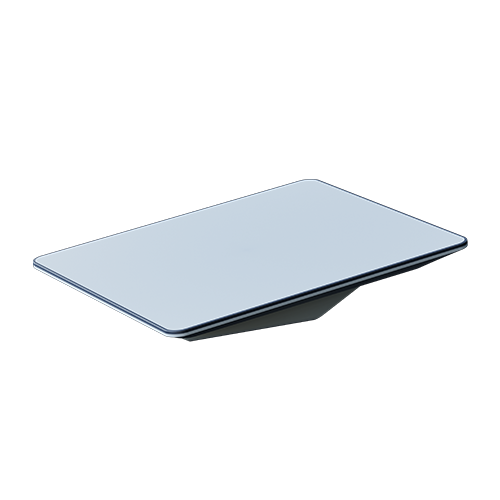
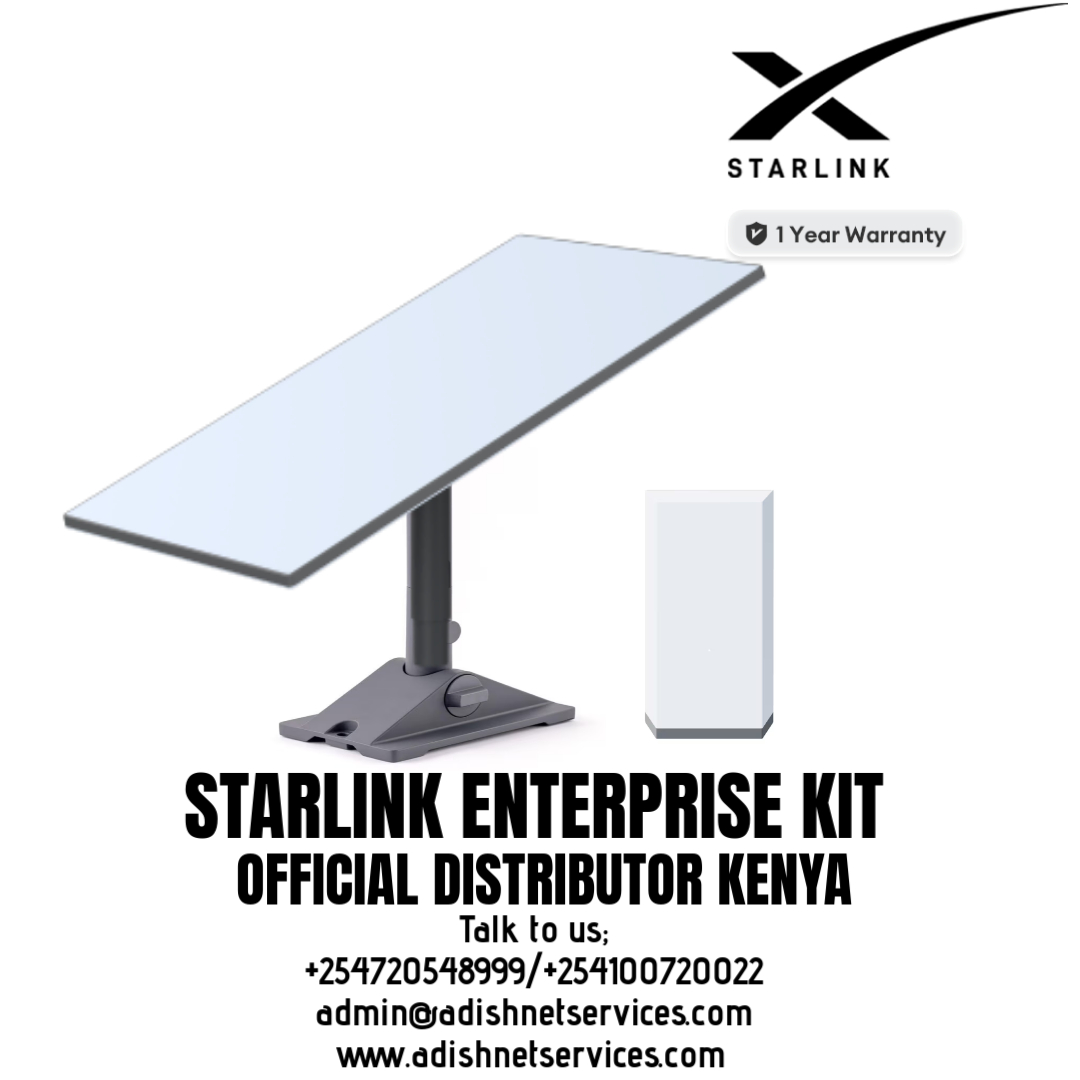
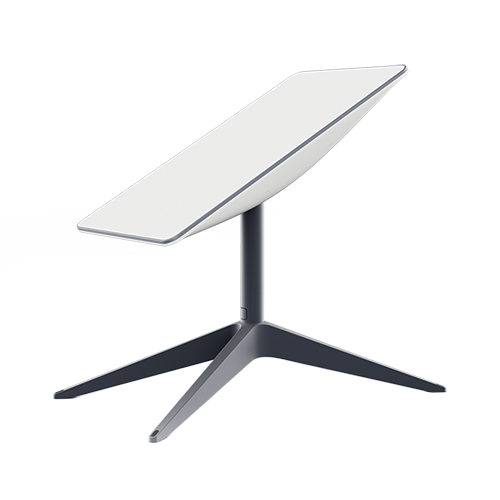
Using the same dish as The Starlink Standard V4, Starlink Enterprise is the new business-focused solution that provides high-capacity internet connectivity to businesses. With a larger PSU to support stronger upload speeds as well as smoother connection to the Starlink constellation, while also providing increased integration with customer 3rd party routers. Whether your operations are based in a bustling city or a remote location, the Starlink Enterprise Kit is your gateway to superior internet performance.
Key Features:
Unmatched Performance: The Starlink Enterprise Kit offers blazing-fast internet with download speeds of up to 220 Mbps and upload speeds of up to 25 Mbps. This ensures your business can handle data-heavy tasks, video conferencing, and cloud-based applications with ease.
Ultra-Low Latency: With latency as low as 20-40 ms, the Enterprise Kit is ideal for real-time applications such as online collaboration, VoIP, and remote desktop use, providing a seamless and professional communication experience.
Scalable Connectivity: The Enterprise Kit is designed to support a high number of simultaneous users and devices, making it perfect for large offices, retail locations, and multi-site operations. Scale your connectivity to meet the demands of your growing business.
Robust Reliability: Built to operate efficiently in extreme weather conditions, the Starlink Enterprise Kit is designed for durability, ensuring continuous connectivity even in challenging environments.
Global Coverage: Leveraging Starlink’s extensive satellite network, the Enterprise Kit provides reliable internet access in remote and underserved regions, ensuring your business stays connected wherever you operate.
Optimised for Business: The Enterprise Kit includes comes without the traditional Starlink router, allowing businesses to easily integrate Starlink with their existing infrastructure.
Specifications:
Environmental Rating: IP67
Speed: Up to 220Mbps download, Up to 25 Mbps upload
Field of View: 110°
Power Consumption Average: 75-100 W/hour
Connectivity: WiFi 6
Wind Rating: Operational: 96kph/60mph+
Dimensions: 18.8 x 27 x 6.3 in
Please use the Product Specification Sheet for more information
Use Cases:
Agriculture: Enables advanced precision farming with enhanced IoT connectivity and real-time data monitoring in remote locations.
IT & Data Centres: IT companies and data centres can use the Enterprise kit for backup or primary connectivity solutions, ensuring consistent and fast internet for critical operations and cloud services.
Construction: Facilitates reliable internet for project management, communication, and data transfer on remote construction sites with improved performance, and enhanced integration capabilities.
Education: Enables remote schools and educational facilities to access high-speed internet for online learning, virtual classrooms, and educational resources.
Emergency Services: Ensures vital communication for disaster response teams and temporary shelters, providing better coordination and resource management during emergencies.
Starlink Enterprise Kit – Setup Guide
Starlink Enterprise Kit

Helpful Tools
- Setup Guide PDF
- Starlink Enterprise Specs Guide PDF / Starlink Enterprise Specs (webpage)]
- Accessory Guide PDF
- For Enterprise activation, visit your Starlink dashboard and follow the steps here.
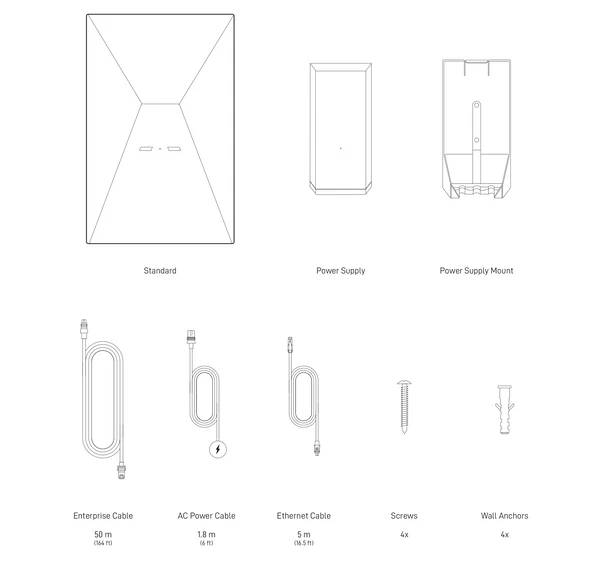
What’s included with my Starlink Enterprise Kit?
- Starlink Standard
- Power Supply
- Power Supply Mount
- Enterprise Cable 50m (164 ft)
- AC Power Cable 1.8 m (6 ft)
- Ethernet Cable 5m (16.5 ft)
- Screws 4x
- Wall Anchors 4x
(For local setup):
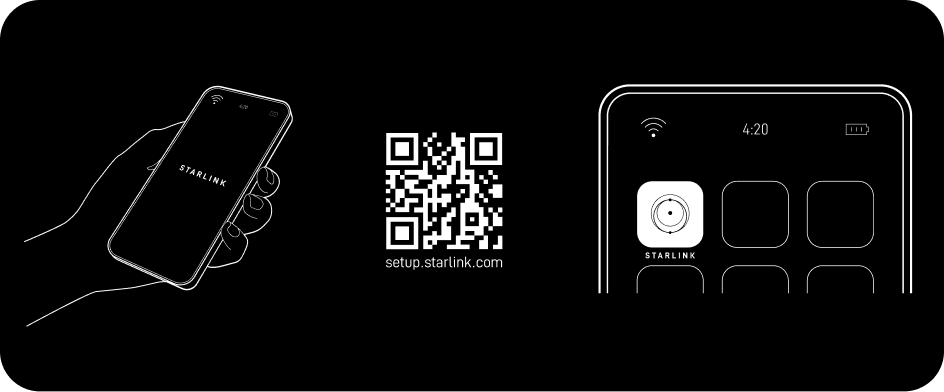
1. Download the Starlink App
Download the Starlink App and scan the QR code located on the kit packaging to step through the install process.
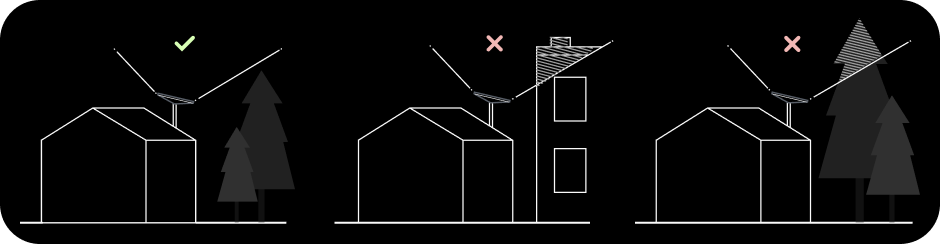
2. Find A Clear View of Sky and Check for Obstructions
Your Starlink needs a clear view of the sky so it can stay connected with satellites as they move overhead. Objects that obstruct the connection between your Starlink and the satellite, such as a tree branch, pole, or roof, will cause service interruptions. Use the obstruction tool in the App to ensure you have selected a suitable mounting location. Click here for video guidance on obstructions.
3. Install Mount
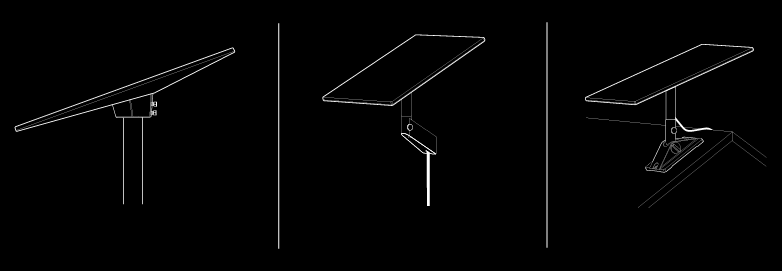
Using your desired Starlink mount, install in an elevated location, like a roof, pole, or wall. Additional mounts and accessories are available for purchase on the Starlink Shop
4. Connect and Align Starlink
Follow the cable routing instructions for your chosen Starlink mount and plug one end of the Enterprise Cable into your Starlink. Ensure the plug is fully inserted such that the plug face is flush with the surface. To remove the cable, pull firmly outward as there is no release tab. Plug the other end of the Enterprise Cable to your Power Supply.
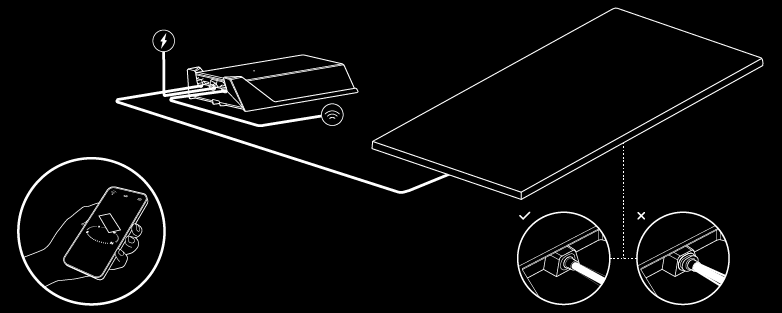
Connect the Ethernet Cable to the power supply and the other end to a router.
If you have a Starlink router, step through the Starlink install process on the Starlink App. Once connected, an alert on the App will show if you need to rotate Starlink to be properly aligned. Click the alert to use the alignment tool. See here for additional guidance on the alignment tool.
If you have a compatible third-party router, follow the router’s set up instructions.
5.Connect to WiFi
- On your device, find and connect to the STARLINK network in your WiFi settings.
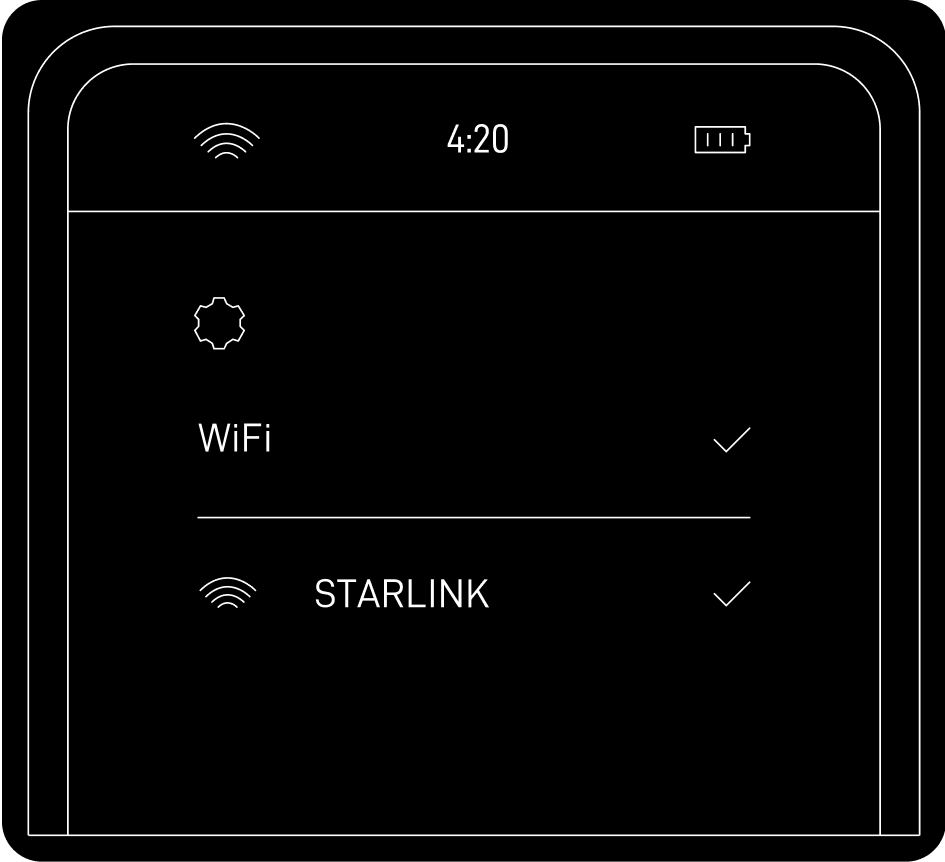
- Once connected, a browser window will open prompting you to enter a new SSID (Network name) and password. This step is optional but recommended.
- You are now connected! Open the Starlink App to customize additional settings, check your connection, and more.
Recommended Topics:
I cannot get online during initial setup
Can’t find what you’re looking for? Contact Support.
{post_title}
Related products
-
Add to cart
What Is Starlink Roam**
Starlink Roam is a service plan from Starlink that enables on land travel with a Starlink dish. There are two options for Starlink Roam: Regional Roam, and Global Roam. Starlink Roam is Starlink’s portable service product line, and it is the new name for Starlink RV. Starlink satellites cover nearly all land on Earth, but the service is still available based on regulatory approval. You can check for up-to-date coverage information on the Starlink availability map.
Both Roam services come with a Standard Starlink hardware kit. Regional Roam has an option to upgrade to the Flat High Performance hardware for in-motion use. The Standard equipment is identical to the equipment sold with Residential. Contents of the kit include the Starlink dish, stand, router, and cables. Find out more about what comes with a Starlink kit here.
Starlink Roam Cost
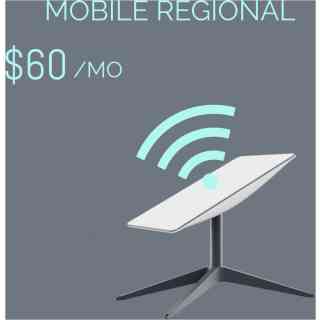
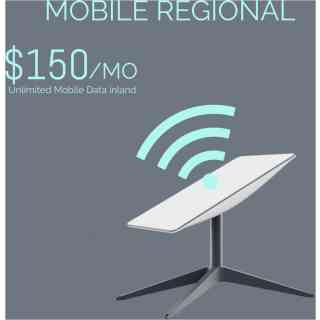
The hardware kit for Global Roam costs $599, and you will pay $200 per month for the service. Global Roam can be paused so that you aren’t billed when it’s not in use. There are no contracts required, and customers can return the kit within 30 days for a full refund if they are not satisfied. Regional Roam (formerly Starlink RV) costs $150/month, with the hardware kit starting at $599.
You can also transfer previously used Starlink equipment into a new Global Roam or Regional Roam account. For details on this process, check out our guide on transferring and activating service for a used dish.
How Does Global Roaming Work**
The technology that allows global roaming to work is the inter-satellite links that have been going into service on the newer generations of Starlink satellites. Also known as the ‘space lasers’, these inter-satellite laser links allow for incredibly fast satellite to satellite communication. Global connectivity is achieved by reducing the amount of ground stations required to send data to the internet.
Before the space lasers, data was sent to the internet only via Starlink ground stations. Since there aren’t ground stations in every country, some areas of the globe were simply too far away from ground stations to be reliably serviced. The laser links allow data to be sent from satellite to satellite, through the Starlink constellation, and then to the optimal ground station. This enables low latency, high speed internet virtually anywhere on Earth.
Who Is It For**

At $200/month, Global Roam isn’t exactly cheap compared to most internet plans. In my opinion, Global Roaming will be best for international travelers or organizations who require Starlink service on multiple continents. Starlink Regional Roam is still available for $50/month cheaper, and will appeal to people who don’t need to travel between continents.
If connectivity is important to you on land, across the globe, Global Roam is a great value. There aren’t any other providers that offer global coverage with low latency and high speeds. My guess is that a lot of non-profits, businesses, and other organizations who operate in many different locations around the world will be the first to utilize this new service.
Regular domestic travelers, which includes most RV’ers, overlanders, campers, etc., will still find the best value with Regional Roam. With Regional Roam, you still have the ability to travel within an entire continent, you just can’t cross into another one.
Regional Roaming vs Global Roaming
You may be wondering, what’s the difference between Regional and Global Roaming** The first major difference is that Global Roam doesn’t have travel restrictions like the Regional plan. Starlink Regional Roam is limited to use within the same continent as the customers shipping address. Global Roam doesn’t have that restriction, so it can be used globally on virtually any continent.
The other difference is cost. Starlink Regional Roam costs $150/month, while Global Roam costs $200/month. The equipment cost for both services is the same at $599.
Finally, the last important distinction between Regional and Global Roam is that the in-motion, Flat High Performance hardware is not available for Global Roaming. The in-motion Starlink hardware can only be purchased on the Regional Roam plan.
What Speeds Do I Get With Starlink Roam**
Both Starlink Roam plans (Regional and Global) are deprioritized on the Starlink network. That means in times of network congestion, performance may suffer compared to Residential and Business Starlink customers in the area. That said, Starlink says Roam customers will get between 5-50 mbps download speeds, and 2-10 mbps upload speeds.
It’s also important to note that the Starlink satellite constellation isn’t yet finished. Starlink says that Global Roam customers should expect higher latency and regular service interruptions. Global roaming, as of right now, is a best effort kind of service. As more laser links come online, reliability and performance will improve. Regional Roam customers, who are typically in areas with existing Starlink ground stations, will have less of an issue with interruptions and reliability.
Does Roam Have Unlimited Data**
Starlink Roam plans come with unlimited data, there are no caps or limits. Roam traffic is deprioritized on the Starlink network, so your speeds may be reduced or throttled in times on network congestion.
How Do I Order**
You will find the Roam service on the Starlink.com website, under the Roam menu. From there, enter your shipping address. Then, pick whether you want the standard Portable or the Mobile hardware (Mobile is not available with Global Roam). Finally, select Regional or Global Roam.
Finish filling out your information, and place the order. Billing starts 14 days after your order ships. You have up to 30 days from delivery to return your Starlink kit for a full refund.
How To Switch Between Global And Regional Roam
Starlink makes it pretty easy to switch between the Global and Regional Roam plans. Let’s say you typically only travel with Starlink in the US, but you have an upcoming trip to South America. You can switch to Global Roam to be able to use your dish outside of North America, and then switch back to the cheaper Regional plan when you return.
To switch between Global and Regional, log in to your Starlink.com account portal. Click Manage next to your Roam plan. Then click Change Service Plan. Choose between Regional, Global, and even the entry-level Maritime plan if you need to use Starlink at sea.
Restrictions With Starlink Roam
The two month restriction remains in place for both Starlink Roam plans. Starlink says that users who stay in one country for more than 2 months will need to update their registered address:
3.3 Limitation and Requirements for Starlink Roaming Users. Starlink Roaming Services is a consumer product only and is not available for purchase or use by commercial, enterprise, or governmental users. If you use Starlink Roaming Services for more than two months in a country that is different than your shipping address, Starlink may require you to move your registered address to your new location. Starlink does not guarantee when or where Starlink Roaming Services will be available. Starlink Roaming Services are dependent on many factors, including obtaining or maintaining the necessary regulatory approvals which are subject to change. Find a list of authorized territories (marked “Available or Waitlist”) on Starlink map: www.starlink.com/map.
According to Starlink, the ‘registered address’ mentioned above is only for tax and billing purposes. So if you originally ordered Roam in Mexico, but stay in Canada for more than 2 months, the address on your Starlink account could update to Canada for tax and billing purposes. If the new country has a higher subscription cost, you may see your monthly bill increase.
Final Thoughts
The branding from Starlink RV to Starlink Roam came as a surprise to me and most Starlink fans. But after digging through the details and writing this article, I already feel confident that it was a smart move. After all, customers are using the portable Starlink service for way more than just RV’s. I feel that the new Roam name reflects the possibilities of the service even better than before.
The global roaming feature available with Starlink Roam is going to be a hit for many international travelers and organizations. Now you won’t have to worry about where you buy the equipment. You just buy it once and go, without worrying about straying outside of the original continent you purchased it in.
Do you find the features of Global Roam appealing for your situation** Is $200/month a reasonable price for this feature for the ability to travel globally** I would love to know your thoughts in the comments!
-
Starlink In Saint Georges : A New Era of Connectivity
KSh 55,000.00Add to cartWhat Is Starlink Roam**
Starlink Roam is a service plan from Starlink that enables on land travel with a Starlink dish. There are two options for Starlink Roam: Regional Roam, and Global Roam. Starlink Roam is Starlink’s portable service product line, and it is the new name for Starlink RV. Starlink satellites cover nearly all land on Earth, but the service is still available based on regulatory approval. You can check for up-to-date coverage information on the Starlink availability map.
Both Roam services come with a Standard Starlink hardware kit. Regional Roam has an option to upgrade to the Flat High Performance hardware for in-motion use. The Standard equipment is identical to the equipment sold with Residential. Contents of the kit include the Starlink dish, stand, router, and cables. Find out more about what comes with a Starlink kit here.
Starlink Roam Cost
The hardware kit for Global Roam costs $599, and you will pay $200 per month for the service. Global Roam can be paused so that you aren’t billed when it’s not in use. There are no contracts required, and customers can return the kit within 30 days for a full refund if they are not satisfied. Regional Roam (formerly Starlink RV) costs $150/month, with the hardware kit starting at $599.
You can also transfer previously used Starlink equipment into a new Global Roam or Regional Roam account. For details on this process, check out our guide on transferring and activating service for a used dish.
How Does Global Roaming Work**
The technology that allows global roaming to work is the inter-satellite links that have been going into service on the newer generations of Starlink satellites. Also known as the ‘space lasers’, these inter-satellite laser links allow for incredibly fast satellite to satellite communication. Global connectivity is achieved by reducing the amount of ground stations required to send data to the internet.
Before the space lasers, data was sent to the internet only via Starlink ground stations. Since there aren’t ground stations in every country, some areas of the globe were simply too far away from ground stations to be reliably serviced. The laser links allow data to be sent from satellite to satellite, through the Starlink constellation, and then to the optimal ground station. This enables low latency, high speed internet virtually anywhere on Earth.
Who Is It For**

At $200/month, Global Roam isn’t exactly cheap compared to most internet plans. In my opinion, Global Roaming will be best for international travelers or organizations who require Starlink service on multiple continents. Starlink Regional Roam is still available for $50/month cheaper, and will appeal to people who don’t need to travel between continents.
If connectivity is important to you on land, across the globe, Global Roam is a great value. There aren’t any other providers that offer global coverage with low latency and high speeds. My guess is that a lot of non-profits, businesses, and other organizations who operate in many different locations around the world will be the first to utilize this new service.
Regular domestic travelers, which includes most RV’ers, overlanders, campers, etc., will still find the best value with Regional Roam. With Regional Roam, you still have the ability to travel within an entire continent, you just can’t cross into another one.
Regional Roaming vs Global Roaming
You may be wondering, what’s the difference between Regional and Global Roaming** The first major difference is that Global Roam doesn’t have travel restrictions like the Regional plan. Starlink Regional Roam is limited to use within the same continent as the customers shipping address. Global Roam doesn’t have that restriction, so it can be used globally on virtually any continent.
The other difference is cost. Starlink Regional Roam costs $150/month, while Global Roam costs $200/month. The equipment cost for both services is the same at $599.
Finally, the last important distinction between Regional and Global Roam is that the in-motion, Flat High Performance hardware is not available for Global Roaming. The in-motion Starlink hardware can only be purchased on the Regional Roam plan.
What Speeds Do I Get With Starlink Roam**
Both Starlink Roam plans (Regional and Global) are deprioritized on the Starlink network. That means in times of network congestion, performance may suffer compared to Residential and Business Starlink customers in the area. That said, Starlink says Roam customers will get between 5-50 mbps download speeds, and 2-10 mbps upload speeds.
It’s also important to note that the Starlink satellite constellation isn’t yet finished. Starlink says that Global Roam customers should expect higher latency and regular service interruptions. Global roaming, as of right now, is a best effort kind of service. As more laser links come online, reliability and performance will improve. Regional Roam customers, who are typically in areas with existing Starlink ground stations, will have less of an issue with interruptions and reliability.
Does Roam Have Unlimited Data**
Starlink Roam plans come with unlimited data, there are no caps or limits. Roam traffic is deprioritized on the Starlink network, so your speeds may be reduced or throttled in times on network congestion.
How Do I Order**
You will find the Roam service on the Starlink.com website, under the Roam menu. From there, enter your shipping address. Then, pick whether you want the standard Portable or the Mobile hardware (Mobile is not available with Global Roam). Finally, select Regional or Global Roam.
Finish filling out your information, and place the order. Billing starts 14 days after your order ships. You have up to 30 days from delivery to return your Starlink kit for a full refund.
How To Switch Between Global And Regional Roam
Starlink makes it pretty easy to switch between the Global and Regional Roam plans. Let’s say you typically only travel with Starlink in the US, but you have an upcoming trip to South America. You can switch to Global Roam to be able to use your dish outside of North America, and then switch back to the cheaper Regional plan when you return.
To switch between Global and Regional, log in to your Starlink.com account portal. Click Manage next to your Roam plan. Then click Change Service Plan. Choose between Regional, Global, and even the entry-level Maritime plan if you need to use Starlink at sea.
Restrictions With Starlink Roam
The two month restriction remains in place for both Starlink Roam plans. Starlink says that users who stay in one country for more than 2 months will need to update their registered address:
3.3 Limitation and Requirements for Starlink Roaming Users. Starlink Roaming Services is a consumer product only and is not available for purchase or use by commercial, enterprise, or governmental users. If you use Starlink Roaming Services for more than two months in a country that is different than your shipping address, Starlink may require you to move your registered address to your new location. Starlink does not guarantee when or where Starlink Roaming Services will be available. Starlink Roaming Services are dependent on many factors, including obtaining or maintaining the necessary regulatory approvals which are subject to change. Find a list of authorized territories (marked “Available or Waitlist”) on Starlink map: www.starlink.com/map.
According to Starlink, the ‘registered address’ mentioned above is only for tax and billing purposes. So if you originally ordered Roam in Mexico, but stay in Canada for more than 2 months, the address on your Starlink account could update to Canada for tax and billing purposes. If the new country has a higher subscription cost, you may see your monthly bill increase.
Final Thoughts
The branding from Starlink RV to Starlink Roam came as a surprise to me and most Starlink fans. But after digging through the details and writing this article, I already feel confident that it was a smart move. After all, customers are using the portable Starlink service for way more than just RV’s. I feel that the new Roam name reflects the possibilities of the service even better than before.
The global roaming feature available with Starlink Roam is going to be a hit for many international travelers and organizations. Now you won’t have to worry about where you buy the equipment. You just buy it once and go, without worrying about straying outside of the original continent you purchased it in.
Do you find the features of Global Roam appealing for your situation** Is $200/month a reasonable price for this feature for the ability to travel globally** I would love to know your thoughts in the comments!
-
Starlink In Africa : A New Era of Connectivity
KSh 55,000.00Add to cartWhat Is Starlink Roam**
Starlink Roam is a service plan from Starlink that enables on land travel with a Starlink dish. There are two options for Starlink Roam: Regional Roam, and Global Roam. Starlink Roam is Starlink’s portable service product line, and it is the new name for Starlink RV. Starlink satellites cover nearly all land on Earth, but the service is still available based on regulatory approval. You can check for up-to-date coverage information on the Starlink availability map.
Both Roam services come with a Standard Starlink hardware kit. Regional Roam has an option to upgrade to the Flat High Performance hardware for in-motion use. The Standard equipment is identical to the equipment sold with Residential. Contents of the kit include the Starlink dish, stand, router, and cables. Find out more about what comes with a Starlink kit here.
Starlink Roam Cost
The hardware kit for Global Roam costs $599, and you will pay $200 per month for the service. Global Roam can be paused so that you aren’t billed when it’s not in use. There are no contracts required, and customers can return the kit within 30 days for a full refund if they are not satisfied. Regional Roam (formerly Starlink RV) costs $150/month, with the hardware kit starting at $599.
You can also transfer previously used Starlink equipment into a new Global Roam or Regional Roam account. For details on this process, check out our guide on transferring and activating service for a used dish.
How Does Global Roaming Work**
The technology that allows global roaming to work is the inter-satellite links that have been going into service on the newer generations of Starlink satellites. Also known as the ‘space lasers’, these inter-satellite laser links allow for incredibly fast satellite to satellite communication. Global connectivity is achieved by reducing the amount of ground stations required to send data to the internet.
Before the space lasers, data was sent to the internet only via Starlink ground stations. Since there aren’t ground stations in every country, some areas of the globe were simply too far away from ground stations to be reliably serviced. The laser links allow data to be sent from satellite to satellite, through the Starlink constellation, and then to the optimal ground station. This enables low latency, high speed internet virtually anywhere on Earth.
Who Is It For**

At $200/month, Global Roam isn’t exactly cheap compared to most internet plans. In my opinion, Global Roaming will be best for international travelers or organizations who require Starlink service on multiple continents. Starlink Regional Roam is still available for $50/month cheaper, and will appeal to people who don’t need to travel between continents.
If connectivity is important to you on land, across the globe, Global Roam is a great value. There aren’t any other providers that offer global coverage with low latency and high speeds. My guess is that a lot of non-profits, businesses, and other organizations who operate in many different locations around the world will be the first to utilize this new service.
Regular domestic travelers, which includes most RV’ers, overlanders, campers, etc., will still find the best value with Regional Roam. With Regional Roam, you still have the ability to travel within an entire continent, you just can’t cross into another one.
Regional Roaming vs Global Roaming
You may be wondering, what’s the difference between Regional and Global Roaming** The first major difference is that Global Roam doesn’t have travel restrictions like the Regional plan. Starlink Regional Roam is limited to use within the same continent as the customers shipping address. Global Roam doesn’t have that restriction, so it can be used globally on virtually any continent.
The other difference is cost. Starlink Regional Roam costs $150/month, while Global Roam costs $200/month. The equipment cost for both services is the same at $599.
Finally, the last important distinction between Regional and Global Roam is that the in-motion, Flat High Performance hardware is not available for Global Roaming. The in-motion Starlink hardware can only be purchased on the Regional Roam plan.
What Speeds Do I Get With Starlink Roam**
Both Starlink Roam plans (Regional and Global) are deprioritized on the Starlink network. That means in times of network congestion, performance may suffer compared to Residential and Business Starlink customers in the area. That said, Starlink says Roam customers will get between 5-50 mbps download speeds, and 2-10 mbps upload speeds.
It’s also important to note that the Starlink satellite constellation isn’t yet finished. Starlink says that Global Roam customers should expect higher latency and regular service interruptions. Global roaming, as of right now, is a best effort kind of service. As more laser links come online, reliability and performance will improve. Regional Roam customers, who are typically in areas with existing Starlink ground stations, will have less of an issue with interruptions and reliability.
Does Roam Have Unlimited Data**
Starlink Roam plans come with unlimited data, there are no caps or limits. Roam traffic is deprioritized on the Starlink network, so your speeds may be reduced or throttled in times on network congestion.
How Do I Order**
You will find the Roam service on the Starlink.com website, under the Roam menu. From there, enter your shipping address. Then, pick whether you want the standard Portable or the Mobile hardware (Mobile is not available with Global Roam). Finally, select Regional or Global Roam.
Finish filling out your information, and place the order. Billing starts 14 days after your order ships. You have up to 30 days from delivery to return your Starlink kit for a full refund.
How To Switch Between Global And Regional Roam
Starlink makes it pretty easy to switch between the Global and Regional Roam plans. Let’s say you typically only travel with Starlink in the US, but you have an upcoming trip to South America. You can switch to Global Roam to be able to use your dish outside of North America, and then switch back to the cheaper Regional plan when you return.
To switch between Global and Regional, log in to your Starlink.com account portal. Click Manage next to your Roam plan. Then click Change Service Plan. Choose between Regional, Global, and even the entry-level Maritime plan if you need to use Starlink at sea.
Restrictions With Starlink Roam
The two month restriction remains in place for both Starlink Roam plans. Starlink says that users who stay in one country for more than 2 months will need to update their registered address:
3.3 Limitation and Requirements for Starlink Roaming Users. Starlink Roaming Services is a consumer product only and is not available for purchase or use by commercial, enterprise, or governmental users. If you use Starlink Roaming Services for more than two months in a country that is different than your shipping address, Starlink may require you to move your registered address to your new location. Starlink does not guarantee when or where Starlink Roaming Services will be available. Starlink Roaming Services are dependent on many factors, including obtaining or maintaining the necessary regulatory approvals which are subject to change. Find a list of authorized territories (marked “Available or Waitlist”) on Starlink map: www.starlink.com/map.
According to Starlink, the ‘registered address’ mentioned above is only for tax and billing purposes. So if you originally ordered Roam in Mexico, but stay in Canada for more than 2 months, the address on your Starlink account could update to Canada for tax and billing purposes. If the new country has a higher subscription cost, you may see your monthly bill increase.
Final Thoughts
The branding from Starlink RV to Starlink Roam came as a surprise to me and most Starlink fans. But after digging through the details and writing this article, I already feel confident that it was a smart move. After all, customers are using the portable Starlink service for way more than just RV’s. I feel that the new Roam name reflects the possibilities of the service even better than before.
The global roaming feature available with Starlink Roam is going to be a hit for many international travelers and organizations. Now you won’t have to worry about where you buy the equipment. You just buy it once and go, without worrying about straying outside of the original continent you purchased it in.
Do you find the features of Global Roam appealing for your situation** Is $200/month a reasonable price for this feature for the ability to travel globally** I would love to know your thoughts in the comments!
-
Add to cart
What Is Starlink Roam**
Starlink Roam is a service plan from Starlink that enables on land travel with a Starlink dish. There are two options for Starlink Roam: Regional Roam, and Global Roam. Starlink Roam is Starlink’s portable service product line, and it is the new name for Starlink RV. Starlink satellites cover nearly all land on Earth, but the service is still available based on regulatory approval. You can check for up-to-date coverage information on the Starlink availability map.
Both Roam services come with a Standard Starlink hardware kit. Regional Roam has an option to upgrade to the Flat High Performance hardware for in-motion use. The Standard equipment is identical to the equipment sold with Residential. Contents of the kit include the Starlink dish, stand, router, and cables. Find out more about what comes with a Starlink kit here.
Starlink Roam Cost
The hardware kit for Global Roam costs $599, and you will pay $200 per month for the service. Global Roam can be paused so that you aren’t billed when it’s not in use. There are no contracts required, and customers can return the kit within 30 days for a full refund if they are not satisfied. Regional Roam (formerly Starlink RV) costs $150/month, with the hardware kit starting at $599.
You can also transfer previously used Starlink equipment into a new Global Roam or Regional Roam account. For details on this process, check out our guide on transferring and activating service for a used dish.
How Does Global Roaming Work**
The technology that allows global roaming to work is the inter-satellite links that have been going into service on the newer generations of Starlink satellites. Also known as the ‘space lasers’, these inter-satellite laser links allow for incredibly fast satellite to satellite communication. Global connectivity is achieved by reducing the amount of ground stations required to send data to the internet.
Before the space lasers, data was sent to the internet only via Starlink ground stations. Since there aren’t ground stations in every country, some areas of the globe were simply too far away from ground stations to be reliably serviced. The laser links allow data to be sent from satellite to satellite, through the Starlink constellation, and then to the optimal ground station. This enables low latency, high speed internet virtually anywhere on Earth.
Who Is It For**

At $200/month, Global Roam isn’t exactly cheap compared to most internet plans. In my opinion, Global Roaming will be best for international travelers or organizations who require Starlink service on multiple continents. Starlink Regional Roam is still available for $50/month cheaper, and will appeal to people who don’t need to travel between continents.
If connectivity is important to you on land, across the globe, Global Roam is a great value. There aren’t any other providers that offer global coverage with low latency and high speeds. My guess is that a lot of non-profits, businesses, and other organizations who operate in many different locations around the world will be the first to utilize this new service.
Regular domestic travelers, which includes most RV’ers, overlanders, campers, etc., will still find the best value with Regional Roam. With Regional Roam, you still have the ability to travel within an entire continent, you just can’t cross into another one.
Regional Roaming vs Global Roaming
You may be wondering, what’s the difference between Regional and Global Roaming** The first major difference is that Global Roam doesn’t have travel restrictions like the Regional plan. Starlink Regional Roam is limited to use within the same continent as the customers shipping address. Global Roam doesn’t have that restriction, so it can be used globally on virtually any continent.
The other difference is cost. Starlink Regional Roam costs $150/month, while Global Roam costs $200/month. The equipment cost for both services is the same at $599.
Finally, the last important distinction between Regional and Global Roam is that the in-motion, Flat High Performance hardware is not available for Global Roaming. The in-motion Starlink hardware can only be purchased on the Regional Roam plan.
What Speeds Do I Get With Starlink Roam**
Both Starlink Roam plans (Regional and Global) are deprioritized on the Starlink network. That means in times of network congestion, performance may suffer compared to Residential and Business Starlink customers in the area. That said, Starlink says Roam customers will get between 5-50 mbps download speeds, and 2-10 mbps upload speeds.
It’s also important to note that the Starlink satellite constellation isn’t yet finished. Starlink says that Global Roam customers should expect higher latency and regular service interruptions. Global roaming, as of right now, is a best effort kind of service. As more laser links come online, reliability and performance will improve. Regional Roam customers, who are typically in areas with existing Starlink ground stations, will have less of an issue with interruptions and reliability.
Does Roam Have Unlimited Data**
Starlink Roam plans come with unlimited data, there are no caps or limits. Roam traffic is deprioritized on the Starlink network, so your speeds may be reduced or throttled in times on network congestion.
How Do I Order**
You will find the Roam service on the Starlink.com website, under the Roam menu. From there, enter your shipping address. Then, pick whether you want the standard Portable or the Mobile hardware (Mobile is not available with Global Roam). Finally, select Regional or Global Roam.
Finish filling out your information, and place the order. Billing starts 14 days after your order ships. You have up to 30 days from delivery to return your Starlink kit for a full refund.
How To Switch Between Global And Regional Roam
Starlink makes it pretty easy to switch between the Global and Regional Roam plans. Let’s say you typically only travel with Starlink in the US, but you have an upcoming trip to South America. You can switch to Global Roam to be able to use your dish outside of North America, and then switch back to the cheaper Regional plan when you return.
To switch between Global and Regional, log in to your Starlink.com account portal. Click Manage next to your Roam plan. Then click Change Service Plan. Choose between Regional, Global, and even the entry-level Maritime plan if you need to use Starlink at sea.
Restrictions With Starlink Roam
The two month restriction remains in place for both Starlink Roam plans. Starlink says that users who stay in one country for more than 2 months will need to update their registered address:
3.3 Limitation and Requirements for Starlink Roaming Users. Starlink Roaming Services is a consumer product only and is not available for purchase or use by commercial, enterprise, or governmental users. If you use Starlink Roaming Services for more than two months in a country that is different than your shipping address, Starlink may require you to move your registered address to your new location. Starlink does not guarantee when or where Starlink Roaming Services will be available. Starlink Roaming Services are dependent on many factors, including obtaining or maintaining the necessary regulatory approvals which are subject to change. Find a list of authorized territories (marked “Available or Waitlist”) on Starlink map: www.starlink.com/map.
According to Starlink, the ‘registered address’ mentioned above is only for tax and billing purposes. So if you originally ordered Roam in Mexico, but stay in Canada for more than 2 months, the address on your Starlink account could update to Canada for tax and billing purposes. If the new country has a higher subscription cost, you may see your monthly bill increase.
Final Thoughts
The branding from Starlink RV to Starlink Roam came as a surprise to me and most Starlink fans. But after digging through the details and writing this article, I already feel confident that it was a smart move. After all, customers are using the portable Starlink service for way more than just RV’s. I feel that the new Roam name reflects the possibilities of the service even better than before.
The global roaming feature available with Starlink Roam is going to be a hit for many international travelers and organizations. Now you won’t have to worry about where you buy the equipment. You just buy it once and go, without worrying about straying outside of the original continent you purchased it in.
Do you find the features of Global Roam appealing for your situation** Is $200/month a reasonable price for this feature for the ability to travel globally** I would love to know your thoughts in the comments!
-
Mobile Priority Service Plan – ON THE GO 1TB
KSh 139,642.00Add to cartBest for maritime, emergency response, and mobile businesses
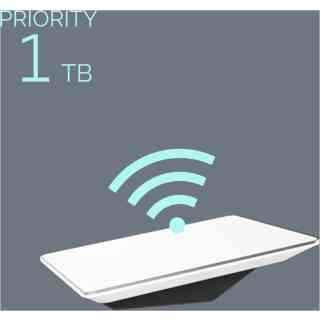
KEY FEATURES;All The Features of Mobile – Global ServiceIn-motion + Ocean UseNetwork PriorityPriority SupportMONTHLY SERVICE PLANSUNLIMITED MOBILE GLOBAL DATA INLAND+MOBILE PRIORITY – 50GB KES34,910/MOMOBILE PRIORITY – 1TB KES139,642/MOMOBILE PRIORITY – 5TB KES698,212/MOAdditional Mobile Priority Data available by the GBRECOMMENDED HARDWARE
FLAT HIGH PERFORMANCEMobile Priority Data – Mobile Priority Data is given network precedence over Standard and Mobile Data, meaning users will experience faster and more consistent download and upload speeds, especially during times of peak usage. Upon exhausting your set Mobile Priority Data amount in a given month, you will be allocated an unlimited amount of Mobile Data for the remainder of the month. Mobile Data will not work for in-motion use above 10 mph or in non-land areas (black regions per the Starlink map), whereas Mobile Priority Data will.DM•Text•Call 24/7 Support
+254 100 720022 / +254 720 548999
info@starlinkinstallerskenya.com
www.starlinkinstallerskenya.com


Reviews
There are no reviews yet.